Klik Iklan dibawah ini, Anda akan mendapatkan komisi sampai 1jt/bulan,Anda akan berminat :


Tampilkan postingan dengan label Software. Tampilkan semua postingan

Menonton Video Streaming Tanpa Buffering

Anda tentu sudah tidak asing lagi dengan Youtube, meteacafe atau situs video streaming lainnya yang sangat menyenangkan dan menarik untuk dikunjungi. Tapi saya yakin, pada saat koneksi internet sedang lambat atau memang anda mempunyai koneksi internet yang lambat maka kenyamanan untuk menonton video streaming sangat terganggu dengan hal yang namanya buffering.

Untuk mengatasi hal tersebut, saya punya sebuah cara yang mungkin bisa membantu. Bywifi Video Accelerator bisa mempercepat bit-rate video streaming hingga 3-5 kali lebih cepat. Selain itu ada beberapa fungsi lain yang sangat membantu seperti "download" yang bisa digunakan untuk mendownload video dari beberapa situs video streaming yang didukung oleh Bywifi Video Accelerator.

Situs yang didikung oleh Bywifi Video Accelerator adalah:
YouTube, Facebook, Dailymotion, Veoh, Metacafe, 56.com, Youku, Tudou, CrunchyRoll, MegaVideo, 5min, 6.cn, 9you, Angry Alien, AnimeEpisodes.Net, Badjojo, Bebo, Blastro, Blennus, Blip.tv, Bofunk, BollywoodHungama, Break, Broadcaster, Buzznet, Chilevision.cl, ClipFish.de, ClipLife.jp, ClipJunkie, ClipShack, CollegeHumor, Current, Current TV, Dachix, Danerd, DailySixer.com, dalealplay, DevilDucky, Disclose.tv, DoubleAgent, eBaumsWorld, elpolvorin, eSnips, ExpertVillage, EVTV1, FindVideos, Flurl, FunnyJunk, FunnyorDie, Glumbert, GodTube, GoFish, Google Video, Graspr, iFilm, Hallpass, HowCast, HowStuffWorks, iShare.Rediff, Jokeroo, Jumpcut, Justin.tv, Kewego, Kontraband, ku6, Izlesene, LiveVideo, LiveLeak, lulu.tv, Mediabum, Midis.biz, MilkandCookies, Mojoflix, MonkeySee, Music.com, MusicMaza, MusicVideoCodes.info, Myspace, MyVideo.de, Newgrounds, NothingToxic, Pikniktube, Pixparty, Photobucket, PlsThx, PokerTube, Putfile, PWNorDIE, RetroJunk, Revver, RuTube.ru, SantaBanta, Sevenload, Sharkle, Shoutfile, Sina Videos, SmitHappens, Snotr, Spike, StreetFire.net, StupidVideos, SuperDeluxe, SuperNovaTube, TeacherTube, That Video Site, TheOnion, TinyPic, TotallyCrap, tu.tv, vbox7, Viddyou, Videa.hu, VideoWebTown, VideoCodesWorld, VideoCodeZone, videolectures, Vidiac, Vidivodo, vidiLife, VidPK, Vimeo, VReel.net, vSocial, Yahoo Videos, WeGame, Wuapi, Yikers, Yobler, YourFileHost, YouSportz, YummyBun, ZippyVideos, Zoopy, zShare.net,
... ...


Bingung cara download-nya??Masuk sini Tutorial Download di narutodownloadarea.blogspot.com

Baca Selengkapnya...

NAMEBENCH - Make Your Internet Faster (Guaranteed)

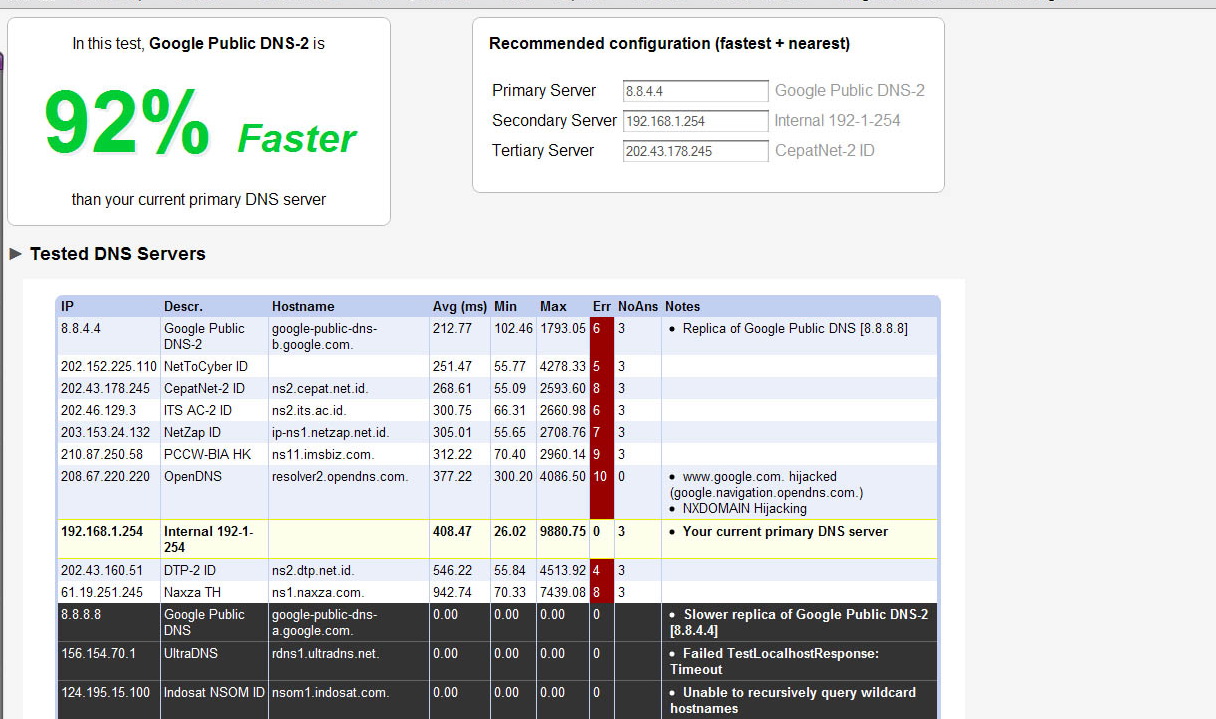
Namebench membantu kita mendapatkan server DNS terbaik, sehingga kita dapat meningkatkan internet speed kita hingga 50%. Degan menemukan DNS yang sesuai bagi komputer kita masing-masing. Jika kita kemarin telah mengetahui GOOGLE PUBLIC DNS dapat mempercepat speed browsing kita, bisa saja DNS yang ditemukan cocok oleh Namebench akan membuat speed internet kita jauh lebih cepat dibandingkan dengan menggunakan GOOGLE PUBLIC DNS.

Caranya gampang :
  1. Buka program Namebench.
  2. Langsung aja tekan "Start Benchmark".
  3. Proses ini memakan waktu sekitar 12 sampai 30 menit.
  4. Setelah selesai Namebench akan memberikan server DNS terbaik bagi komputer anda.
  5. Ganti server DNS anda.
  6. Restart koneksi.
  7. Tadaaaaaaaaaa.........


Bingung cara download-nya??Masuk sini Tutorial Download di narutodownloadarea.blogspot.com

Baca Selengkapnya...

Software Download Subtitle Secara Otomatis

Saya sering mendownload film-film holywood dari situs one click hoster seperti rapidshare, megaupload dan lain-nya. Salah satu kendala dalam menikmati film-film tersebut adalah tidak tersedianya subtitle secara hardsub, sehingga saya harus mencari lagi subtitle agar bisa menikmati film yang sudah di download tersebut. Tentu saja hal tersebut merupakan suatu proses yang membosankan.

Nah, baru-baru ini saya menemukan sebuah software gratis yang bisa digunakan untuk mencari subtitle secara otomatis. Software tersebut adalah Sublight 2.0.3 .


Fitur-fitur dari sublight antara lain:
  • auto subtitle search, 
  • manual search, 
  • preview subtitle before download, 
  • subtitle ratings and commenting, 
  • subtitle lists: "New", "Favorites", "Published by me" and "Downloaded by me", 
  • subtitle download statistics, 
  • all subtitles in primary database are saved in Unicodeencoding, 
  • Windows Explorer integration (optional), 
  • video playback for downloaded subtitles (with just one double click), 
  • video codec detection, 
  • support for VLC, BS.Player, Media Player Classic, KMPlayer, Windows Media Player, Zoom Player and GOM player, 
  • registered users can publish new subtitles (registration is free and very simple), 
  • easy to use and modern user interface (featuring Ribbon like UI), 
  • auto update capability, 
  • you can remove tags from your subtitles, 
  • plugin framework for searching subtitles from other sources, 
  • available in English, French, Spanish, Slovenian and Serbian language
  • (contact us if you would like to translate application to new language), 
  • support for OpenSubtitles.org, Podnapisi.NET, DivxFinland.org, subdivx.com and divx-titlovi.com database, 
  • SublightCmd command line interface for advanced users
  • (can be used for auto subtitle download, movie title detection, .NFO generator, ...), 
  • application is 100% clean, which means it does not contain any form of malware and is completely free.
Memang untuk subtitle dalam Bahasa Indonesia masih sulit dicari, tapi buat saya secara pribadi menonton film dengan subtitle Bahasa Inggris sudah sangat membantu untuk bisa menikmati jalan cerita dari sebuah film. Selain itu menonton film dengan subtitle Bahasa Inggris merupakan salah satu cara yang cukup efektif dalam meningkatkan kemampuan Bahasa Inggris (sekali lagi, ini menurut saya pribadi lo...).

Sebelum menginstall Sublight, pastikan dulu anda sudah menginstal .Net Framework 2.0.
Selamat Menikmati....

System Requirements

* Windows 2000 / XP / 2003 / Vista / 2008 / Windows 7
* Microsoft .NET Framework v2.0 or later
* Koneksi Internet


Bingung cara download-nya??Masuk sini Tutorial Download di NarutoDownloadArea.Blogspot.com


Baca Selengkapnya...

Internetan Semaunya dengan UltraSurf 9.95


Pembatasan proxy pada suatu jaringan memang sering dijumpai. Tidak sedikit pula di unit kampus dan instansi sering mengalami gangguan koneksi saat kita browsing-browsing. Hal ini dapat kita atasi dengan meng-hack proxy yang ada di jaringan yang kita pakai. Salah satu software yang dapat menembus proxy adalah Ultrasurf. Ultrasurf ini dibuat oleh UltraReach Internet Corp.


Prinsip kerja dari hack proxy ini adalah menggunakan proxy orang lain dalam hal ini ultrasurf. Langkah-langkah sebagai berikut :


1. Pastikan komputer anda terinstall program Ultrasurf versi apapun. Jika belum ada maka silahkan download pada link berikut : Download free, Ultrasurf New full version


2. Jalankan aplikasi ultrasurf


3. Anda hanya perlu mengubah setting dari ultrasurf untuk penggunaan proxy ultrasurf dengan cara klik option-proxy setting dan pilih proxy : directly use ultrasurf.


5. Contreng Don’t Use IE jika anda tidak ingin menggunakan browser IE. Jika tidak maka saat anda membuka ultrasurf maka secara otomatis IE akan running.


6. Contreng “Hide Golden Lock” jika anda tidak ingin mengeluarkan gambar gembok di pojok kanan bawah komputer anda


7. Jika terdapat informasi box bahwa “Succesfully Connected To Server” maka ultrasurf sudah dapat anda gunakan dengan baik.


8. Jika terdapat informasi “Cannot conect” atau “Please Check your connection” maka ultrasurf tidak dapat anda pakai.


9. Setelah ultrasurf dalam keadaan succes maka lakukan setting terhadap connection pada browser anda dengan klik tool - options


10. Klik Network-Setting


11. Isikan HTTP proxy configuration 127.0.0.1 Port 9666. Contreng Use this proxy for all protocols. Isikan pada No Proxy For : localhost, 127.0.0.1


12. Klik Ok dan Anda dapat melakukan internet tanpa gangguan apapun.


Selamat Mencoba


Bingung cara download-nya??Masuk sini Tutorial Download di NarutoDownloadArea.Blogspot.com
Baca Selengkapnya...

Jadwal Piala Dunia Africa 2010

Iseng2 cari2 jadwal piala dunia 2010 eh ternyata dapat yang beginian.. E-Walchart atau skoring otomatis pertandingan sepakbola di FIFA World Cup 2010 South Africa dengan Format Excel dan Jam pertandingan sudah di Konversi ke WIB


Download klik disini

Bingung cara download-nya??Masuk sini Tutorial Download di NarutoDownloadArea.Blogspot.com Baca Selengkapnya...


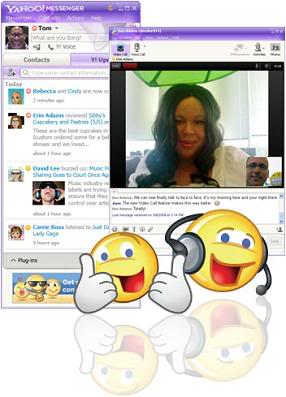
Do more than just IM with Yahoo! Messenger 10

Enhanced video calling
Feel like you're there with high-quality, full screen video and voice calling
Keep up with what your friends are doing
See your friends' latest updates from Yahoo!, Flickr, Twitter and more
with the new “Updates view
Improved language support
Change your preferred language in Yahoo! Messenger with just a few
clicks 

System requirements: micr*soft Windows XP, Vista, 7.

More Features
Instant message with one friend, or conference in a bunch
All-new Insider with Yahoo! Mail, news, weather, search and
more
Easily find or invite friends from other services to come chat
with you
Send text messages (SMS) to friends' mobile phones for free*
Make free PC-to-PC calls and PC-to-phone calls for as low as
 a minute (plus free voicemail!)
Use the built-in media player to watch web videos and view
photos with friends
Show your style with emoticons, Avatars, audibles and IMVironments


NB :Setelah link download di klik akan muncul halaman baru AD FLY.COM, untuk downloadnya silahkan klik SKIP AD di kanan atas maka akan muncul halaman untuk downloadnya

Bingung cara download-nya??Masuk sini Tutorial Download di NarutoDownloadArea.Blogspot.com

Baca Selengkapnya...

Kompres File 2 GB Jadi 5 MB dengan KGB Archiver

Dengan KGB Archiver file yang berukuran besar dapat dikompres menjadi seminim mungkin.
Yang mau mencoba disini link-nya.


Ini contoh hasil kompresan-nya, di dalamnya ada Microsoft Office 2007 & Windows longhorn di kompres jadi 5 MB saja
Klik disini untuk download contoh


Ini screenshootnya


Selamat mencoba !!

NB :Setelah link download di klik akan muncul halaman baru AD FLY.COM, untuk downloadnya silahkan klik SKIP AD di kanan atas maka akan muncul halaman untuk downloadnya

Baca Selengkapnya...

FULLSPEED 3.6.1 PRO BOOST

FULLSPEED 3.6.1 PRO BOOST


Satu lagi software yang berguna untuk mempercepat koneksi internet terutama yang pake koneksi dial-up. Dicoba aja, saya sertakan juga tutorial cara mendapatkan FullSpeed yang pro. Rasakan Bedanya !!!

Hasil tes pake 3GPRS UNLIMITED


DAN DIBAWAH INI FULLSPEED UNLOCKNYA
[UNLOCK

DOWNLOAD JUGA TUTORIAL-NYA

NB :Setelah link download di klik akan muncul halaman baru AD FLY.COM, untuk downloadnya silahkan klik SKIP AD di kanan atas maka akan muncul halaman untuk downloadnya
Baca Selengkapnya...

Tiga Juta Serial Number Software Terbaru

Hai, teman-teman semua

Saya mau berbagi software lagi nih hasil kemarin ber-googling ria
Kebetulan dapet file compress berisi Tiga Juta serial Number software-software terbaru

Saya mau berbagi disini nih
Nih Link download-nya

[ Download ]

Enjoy 4 all !! Baca Selengkapnya...

Internet Download Manager 5.19 Build 2 + Crack

Click the image to open in full size.
Internet Download Manager has a smart download logic accelerator that features intelligent dynamic file segmentation and safe multipart downloading technology to accelerate your downloads. Unlike other download accelerators and managers that segment files before downloading starts, Internet Download Manager segments downloaded files dynamically during download process. Internet Download Manager reuses available connections without additional connect and login stages to achieve better acceleration performance. 


Internet Download Manager supports proxy servers, ftp and http protocols, firewalls, redirects, cookies, authorization, MP3 audio and MPEG video content processing. IDM integrates seamlessly into Microsoft Internet Explorer, Netscape, MSN Explorer, AOL, Opera, Mozilla, Mozilla Firefox, Mozilla Firebird, Avant Browser, MyIE2, and all other popular browsers to automatically handle your downloads. 
You can also drag and drop files, or use Internet Download Manager from command line. Internet Download Manager can dial your modem at the set time, download the files you want, then hang up or even shut down your computer when it's done. Other features include multilingual support, zip preview, download categories, scheduler pro, sounds on different events, HTTPS support, queue processor, html help and tutorial, enhanced virus protection on download completion, progressive downloading with quotas (useful for connections that use some kind of fair access policy or FAP like Direcway, Direct PC, Hughes, etc.), built-in download accelerator, and many others.


Main Features:


• All popular browsers and applications are supported! Internet Download Manager has been tested with the following browsers: Internet Explorer, MSN Explorer, AOL, Netscape Communicator, Netscape 6, Netscape 7, Mozilla, Mozilla Firefox, Mozilla Firebird, Opera, NetCaptor, UltraBrowser, Slim Browser, Avant Browser, MyIE2, Optimal Desktop, Ace Explorer, Advanced Browser, 27 Tools-in-1 Wichio Browser, WindowSurfer, 550 Access Browser, FineBrowser Freeware, Kopassa Browser, Fast Browser Pro, Enigma Browser, GoSuRF, K-Meleon, Smart Explorer, The Off By One Web Browser, Smartalec Voyager, CrystalPort AppCapture, The Family Browser, XANA Web Browser, Bluto, AutoSurf, 32bit Web Browser, BrowseMan, WrestlingBrowser, Eminem Browser, UltraBrowser, Cygsoft LDAP Browser, and Net M@nager. Internet Download Manager supports all versions of popular browsers, and can be integrated into any 3rd party Internet applications.
• Easy downloading with one click. When you click on a download link in a browser, IDM will take over the download and accelerate it. IDM supports HTTP, FTP, HTTPS and MMS protocols.
• Download Speed Acceleration. Internet Download Manager can accelerate downloads by up to 5 times due to its intelligent dynamic file segmentation technology. Unlike other download managers and accelerators Internet Download Manager segments downloaded files dynamically during download process and reuses available connections without additional connect and login stages to achieve best acceleration performance.
• Download Resume. Internet Download Manager will resume unfinished download from the place where they left off.
• YouTube grabber. Internet Download Manager can grab FLV videos from popular sites like YouTube, MySpaceTV, and Google Video.
• Simple installation wizard. Quick and easy installation program will make necessary settings for you, and check your connection at the end to ensure trouble free installation of Internet Download Manager
• Drag and Drop. You may simply drag and drop links to IDM, and drag and drop downloaded files out of Internet Download Manager.
• Automatic Antivirus checking. Antivirus checking makes your downloads free from viruses and trojans.
• Advanced Browser Integration. When enabled, the feature can be used to catch any download from any application. None of download managers have this feature.
• Built-in Scheduler. Internet Download Manager can connect to the Internet at a set time, download the files you want, disconnect, or shut down your computer when it's done.
• IDM includes web site spider and grabber. IDM downloads all required files that are specified with filters from web sites, for example all pictures from a web site, or subsets of web sites, or complete web sites for offline browsing. It's possible to schedule multiple grabber projects to run them once at a specified time, stop them at a specified time, or run periodically to synchronize changes.
• IDM supports many types of proxy servers. For example, IDM works with Microsoft ISA, and FTP proxy servers.
• IDM supports main authentication protocols: Basic, Negotiate, NTLM, and Keberos. Thus IDM can access many Internet and proxy servers using login name and password.
• Download All feature. IDM can add all downloads linked to the current page. It's easy to download multiple files with this feature.
• Customizable Interface. You may choose the order, and what buttons and columns appear on the main IDM window.
• Download Categories. Internet Download Manager can be used to organize downloads automatically using defined download categories.
• Quick Update Feature. Quick update may check for new versions of IDM and update IDM once per week.
• Download limits. Progressive downloading with quotas feature. The feature is useful for connections that use some kind of fair access policy (or FAP) like Direcway, Direct PC, Hughes, etc.
• IDM is multilingual. IDM is translated to Albanian, Arabic, Azerbaijan, Bosnian, Bulgarian, Chinese, Croatian, Czech, Danish, Dutch, Farsi, French, German, Greek, Hebrew, Hungarian, Italian, Japanese, Korean, Lithuanian, Macedonian, Norwegian, Polish, Portuguese, Romanian, Russian, Serbian, Slovak, Slovenian, Spanish, Thai, Turkish, and Uzbek languages.


in version 5.19 build 2 (Apr 29, 2010):


NB :Setelah link download di klik akan muncul halaman baru AD FLY.COM, untuk downloadnya silahkan klik SKIP AD di kanan atas maka akan muncul halaman untuk downloadnya
Baca Selengkapnya...